HaulFinder Start free trial

Your copilot for finding the best loads

Works on DAT One and Truckstop. Instantly email brokers from the load row, cap total DH, see the route, real RPM, profit and broker rating in every load card, and more.

DAT One with HaulFinder: the HaulFinder panel in DAT's left menu, the tabs and columns in the dispatcher's own order, the loads that fit colored, and the first load open with its route map.
The regular DAT One results page on the same loads, with the first load open.
DAT One as isWith HaulFinder
Drag the line to compare. Made-up loads; the DAT One side is a mock-up.

What changes on your board

Email the broker right from the load row

Your mailbox and template are set on the tab. Press the envelope on a load row and the broker gets the email, load details filled in.

  • Several mailboxes and templates, your pick on each tab
  • The envelope on a load row sends the email
  • Load details already filled in
  • Open the letter first when you want to edit
  • Your signature and logo at the end of every email
Mailbox and template set on the tab, then the envelope on a row sends the email.

Call the broker in the phone app you choose

Press the phone button next to a broker's number, and the call opens in your phone system.

  • In the load row and in the open card
  • Pick RingCentral, Quo, Dialpad, Zoom Phone, Microsoft Teams or Webex
  • Or add your own phone app by its link
  • A different phone system for each mailbox

We set your company's default phone system once; each dispatcher can pick their own.

Open a load, see the route

Open a load and the route map is right in its card: empty miles, loaded miles, drive time.

  • Route, total miles and drive time on the map
  • Drag the map and zoom with the wheel
  • Profit from your own MPG, diesel and tolls
  • Change a number in the calculator, the rest follows
  • Broker contacts and the RTS rating in the card
Open a load, see the route, drag the map and zoom in.

Total DH: one limit on the empty miles at both ends

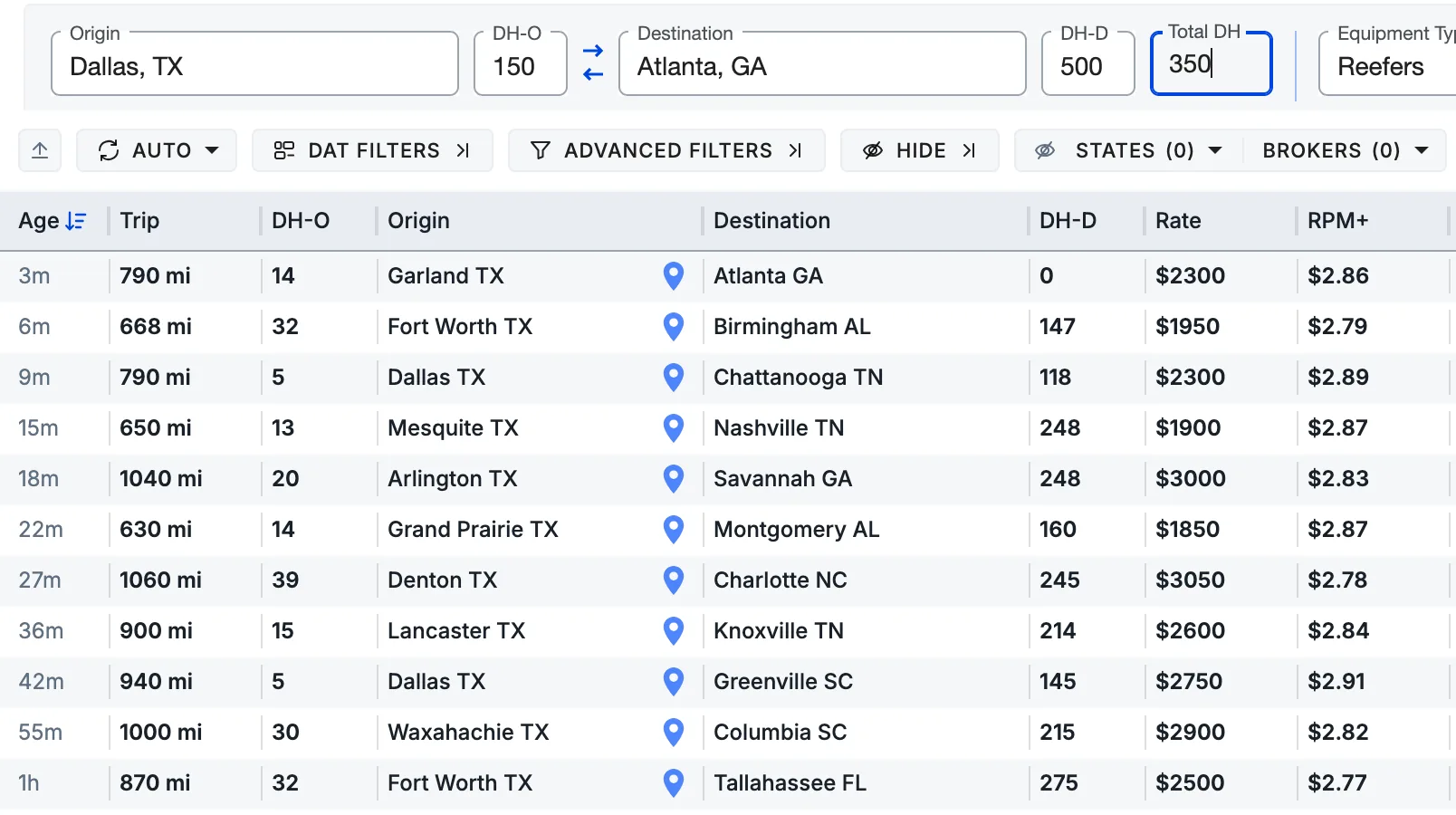
Type one number and every load over it in total, DH-O plus DH-D, leaves the board.

  • Each search tab keeps its own number
  • Real RPM counts the empty miles to the pickupDAT shows $/mi on the trip miles only.
  • Profit counts the same miles as real RPM
  • One switch in Settings adds DH-D to both
  • Sort by real RPM or set a minimum
The Advanced View board with Total DH 350 typed after DH-D in the search form: eleven loads stay, each with its trip, DH-O, DH-D, rate and RPM.
Total DH 350 on the Advanced View board: 16 loads become 11.
One load the limit took off: rate 3350, trip 1160, DH-O 33, DH-D 440
Total DH33 + 440473 mi: over 350, it leaves the board
RPM on trip miles3350 ÷ 11602.89
Real RPM3350 ÷ (1160 + 33)2.81
With DH-D, by the switch3350 ÷ (1160 + 33 + 440)2.05

Know the broker before you book

The RTS rating and your company's own notes, right on the load.

  • The RTS letter on the row and in the card
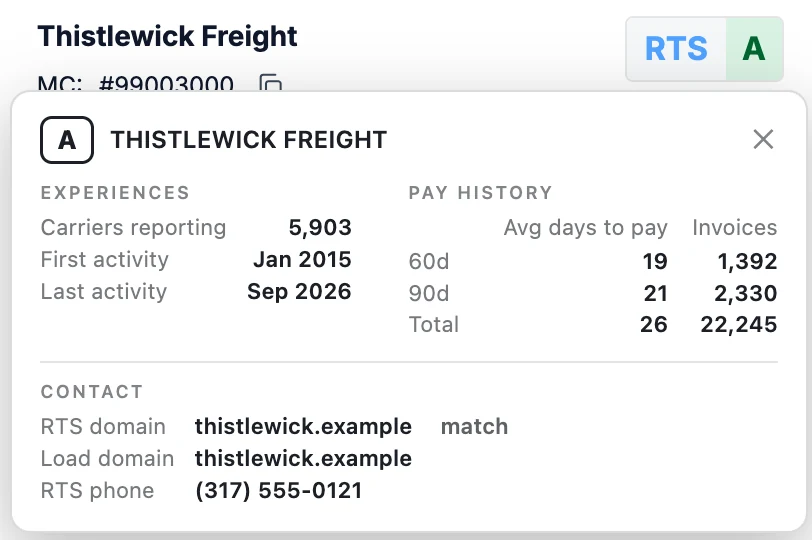
  • Click it for carriers reporting and pay history
  • One broker list for your whole company
  • Your tag comes first in the load's COMMENTS
  • Hide brokers with a bad rating, one switch

The rating needs your own RTS Pro account, connected once.

The RTS mini-window open on a load: carriers reporting, first and last activity, average days to pay with the invoices, and the load's contact checked against RTS.
COMMENTS on a load: the company's tag DO NOT BOOK and its note come first, then the broker's own comment.The broker's name, MC, phone and email in the card, with the buttons to call, email and copy.
Click the RTS letter for the report. Your company's tag comes first in COMMENTS.

Advanced View: one board on DAT One and Truckstop

Advanced View sits on top of the search results, one switch away. Put tabs and columns in your order and hide the ones you skip.

  • Drag the search tabs into your order
  • Move columns, hide the ones you skip
  • Arrange the load card's blocks with Configure card
  • Color the loads that fit your limits
  • The HaulFinder panel in DAT's own menu
Tabs in your order, columns where you read them, the loads that fit in color.

Set it up the way you work

Each dispatcher sets their own once, and the admin looks after the team.

The board

  • Columns: their order, width and which ones show
  • Table zoom from 70 to 130 %
  • Load card: block order, map and notes on or off
  • Dark Mode for the board

Searches and tabs

  • A mailbox and a template on each tab
  • Default equipment for every new search
  • Click city to search out of a destination
  • Filters on each tab, or one set for all tabs

Filters and colors

  • Min and max trip, min and max weight
  • Min RPM and min rate
  • Color the loads that fit, or hide the rest
  • Your color for each group of filters

RPM and profit

  • Your own MPG, diesel and tolls
  • Diesel starts from the US weekly average
  • Count DH-D in RPM and profit, on or off
  • An extra column with RPM on trip miles

Email

  • Several Gmail or Google Workspace mailboxes
  • A list of templates for each mailbox
  • Load fields you insert into a template
  • A signature with text, logo and links

Calls and team

  • A default phone app, and one per mailbox
  • Invite dispatchers by work email
  • Admin or Member for each person
  • Your company's broker list and its tags

And many more features to boost your productivity

  • Skip destination states and brokers
  • Copy a load's info with one press
  • The median rate by trip length under the board
  • Held back: how many loads your filters hide
  • Your own notes on a load, by the lane

Running a team? One admin adds the dispatchers, and everyone works from the same broker list.

The recordings and pictures are real HaulFinder on made-up brokers and loads.

Works with your tools

Every dispatch office runs a little differently. We connect HaulFinder to the tools and extensions your team already uses, and we build custom integrations for your workflow.

Questions

What is HaulFinder?

A Chrome extension for DAT One and Truckstop that adds one-press broker emails and calls, route maps, Total DH, real RPM, profit from your own costs and the RTS rating, on a board arranged your way.

How is it different from what DAT shows?

DAT shows $/mi on the trip miles only, while HaulFinder counts the deadhead, works out profit from your diesel, MPG and tolls, and lets you arrange the board your way.

Which load boards does it work on?

DAT One and Truckstop, on each dispatcher's own account, with the same broker emails, calls, RTS rating and profit on both.

How does the email work?

Set a mailbox and a template on a tab, then press the envelope on a load row: the email goes out from your Gmail or Google Workspace with the load details already filled in.

What can each dispatcher set up?

The mailbox and template on each tab, the columns and the load card, filter limits and colors, default equipment, diesel, MPG and tolls, the phone app and Dark Mode.

Can you connect it to our other tools?

Yes, we build custom integrations for your workflow, so write to us and describe how your dispatchers work.

How much does it cost?

Free for 30 days, then $11.99 per dispatcher per month, with everything included.

How fast can my team start?

Each dispatcher installs the extension, signs in with their work email and is working on their next DAT One or Truckstop search.

Can I see it before I decide?

Yes, start the free trial and try it on your own searches, or book a demo and we'll walk you through it.

Pricing

$11.99USD per dispatcher, per month

The first 30 days are free

Everything on this page is included for every dispatcher.

Running a company? Contact our sales rep to get your special offer.

  • Chrome on a computer
  • A DAT One or Truckstop login for each dispatcher
  • Gmail or Google Workspace for email
  • No card to start the trial
Start free trial